
Discount code removed alerts
When to use this workflow
Use this workflow when a discount code is removed and you need an immediate record of what was affected. It helps you capture the removed code, its usage count, the campaign details, and a summary you can send to finance or operations in Slack.
This is especially useful for leaked influencer codes, unplanned coupon exposure, or any case where you need a documented impact report after a code is removed.
What you will build
- A Slack workflow that receives a
textvariable from a webhook and posts that same text into a Slack channel. - A Shopify Flow workflow triggered by Discount Code Removed.
- A Get discount data step that looks up the discount using the ID from the trigger.
- A Run code step that formats a removal report.
- An HTTP Request step that sends the report to Slack.
Before you begin
- Make sure the app is installed and visible in Shopify admin under Apps > Workflow Trigger Extensions.
- Make sure you have access to Shopify Flow.
- Create or choose a Slack channel where alerts should appear.
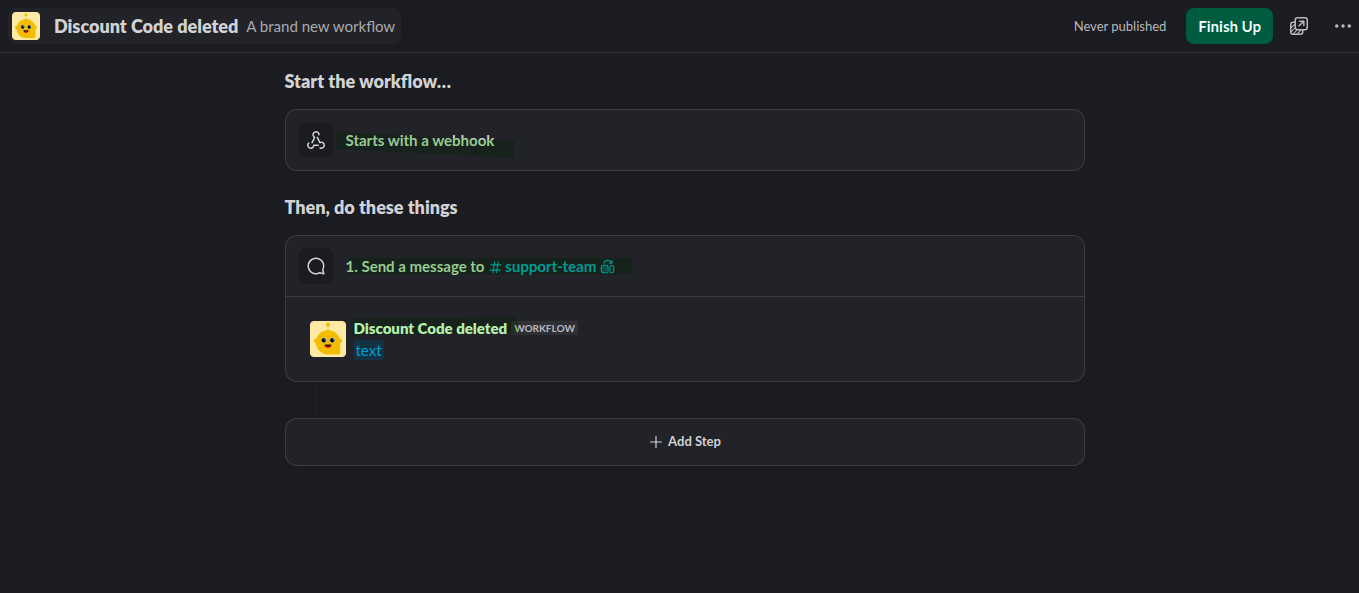
- Create a Slack workflow that starts with a webhook and accepts a
textfield.
Video Guide
You can see the full implementation video as well.
Create the Slack workflow first
In Slack, create a workflow with the trigger Starts with a webhook. Add a text variable named text, then add the message step that sends a message to your chosen channel using that same text variable.
Grant Discount Access in Workflow Trigger Extensions
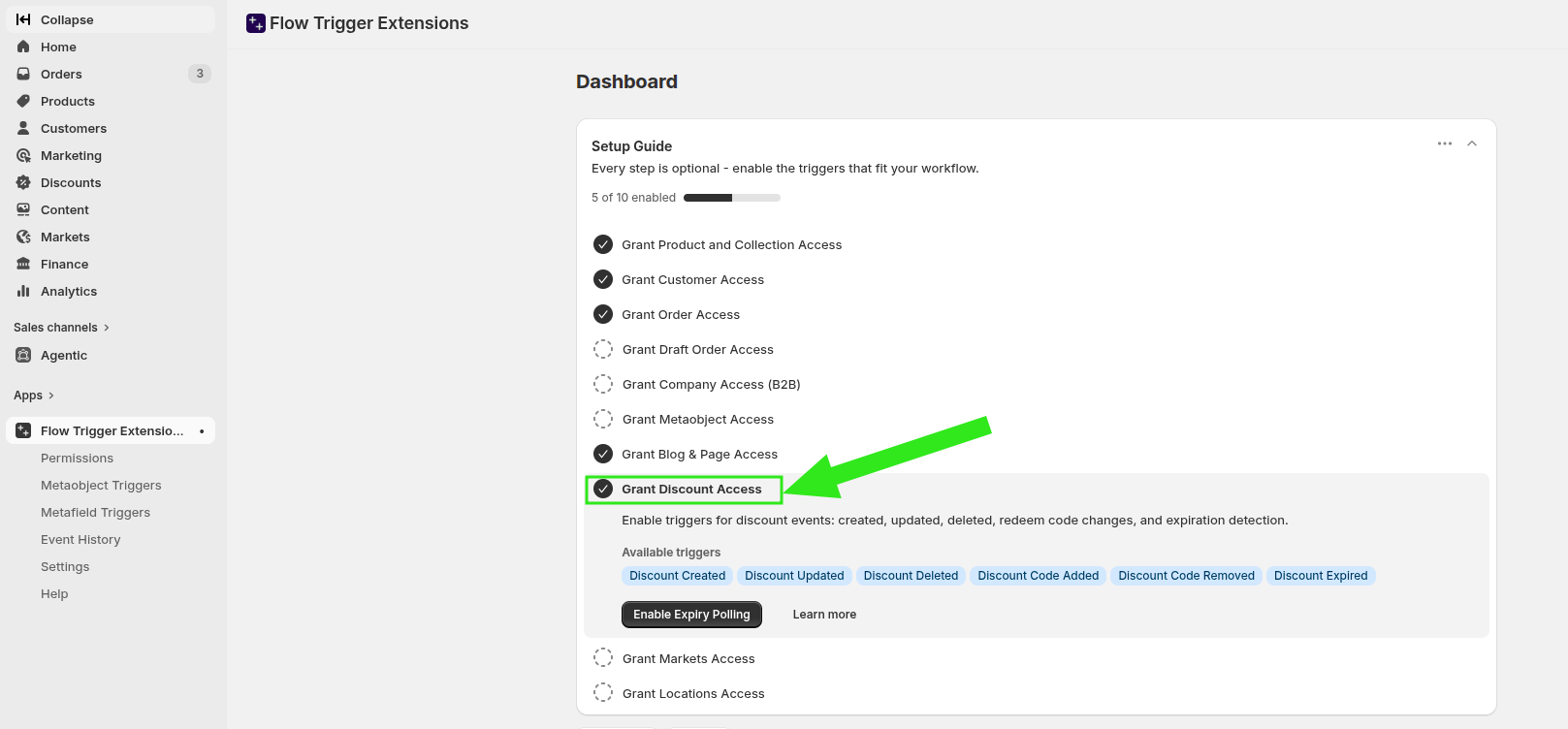
Before the trigger appears in Shopify Flow, enable discount access in the app.
In Shopify admin, go to Apps > Workflow Trigger Extensions.
On the Dashboard, look for the setup checklist.
Turn on Grant Discount Access. This enables discount-related triggers such as Discount Created, Discount Updated, Discount Deleted, Discount Code Added, Discount Code Removed, and Discount Expired.
Build the Shopify Flow
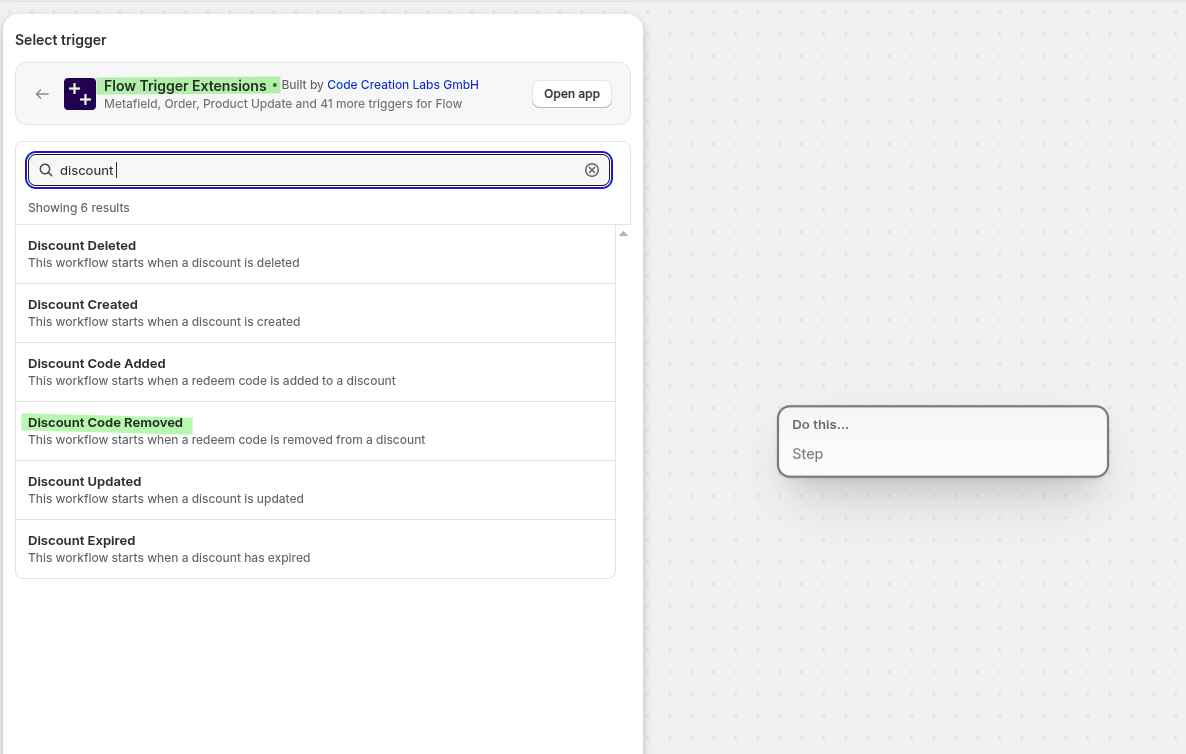
Open Shopify Flow and create a new workflow.
Search for discount-related triggers and select Discount Code Removed from Workflow Trigger Extensions.
Add the Shopify action Get discount data.
In Select a query to filter data, choose Advanced. In Edit query, use the discount ID from the trigger and remove the Shopify GID prefix:
id:"{{discount.id|remove:'gid://shopify/DiscountCodeNode/'}}"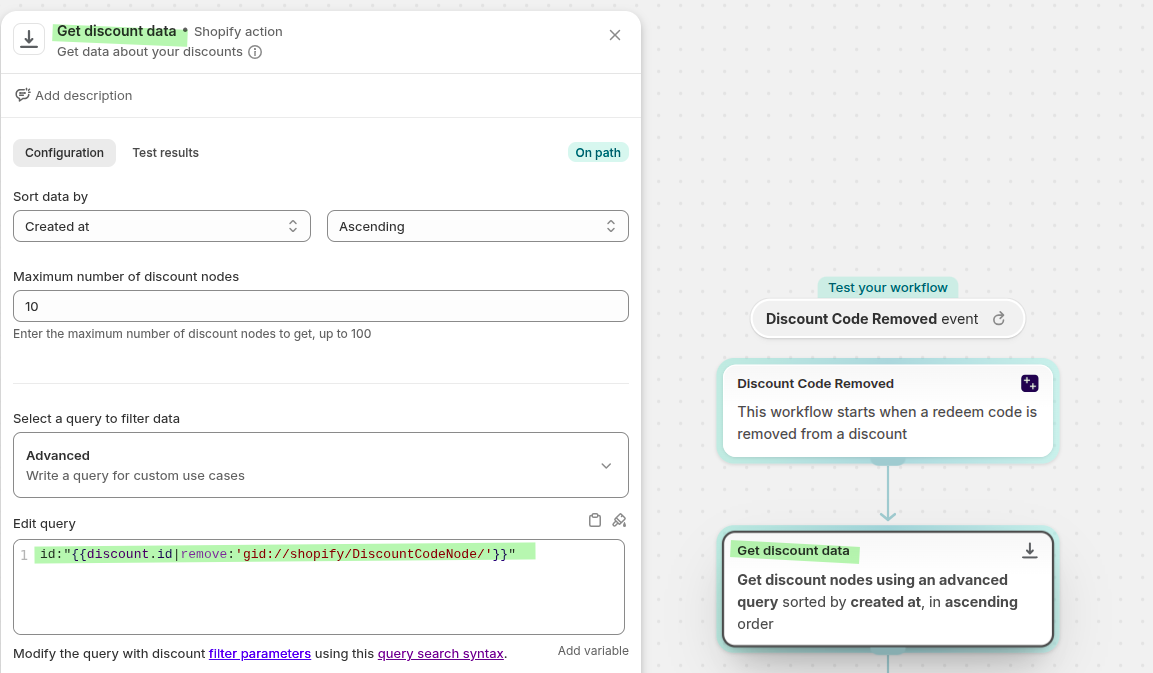
Add a Run code step after Get discount data.
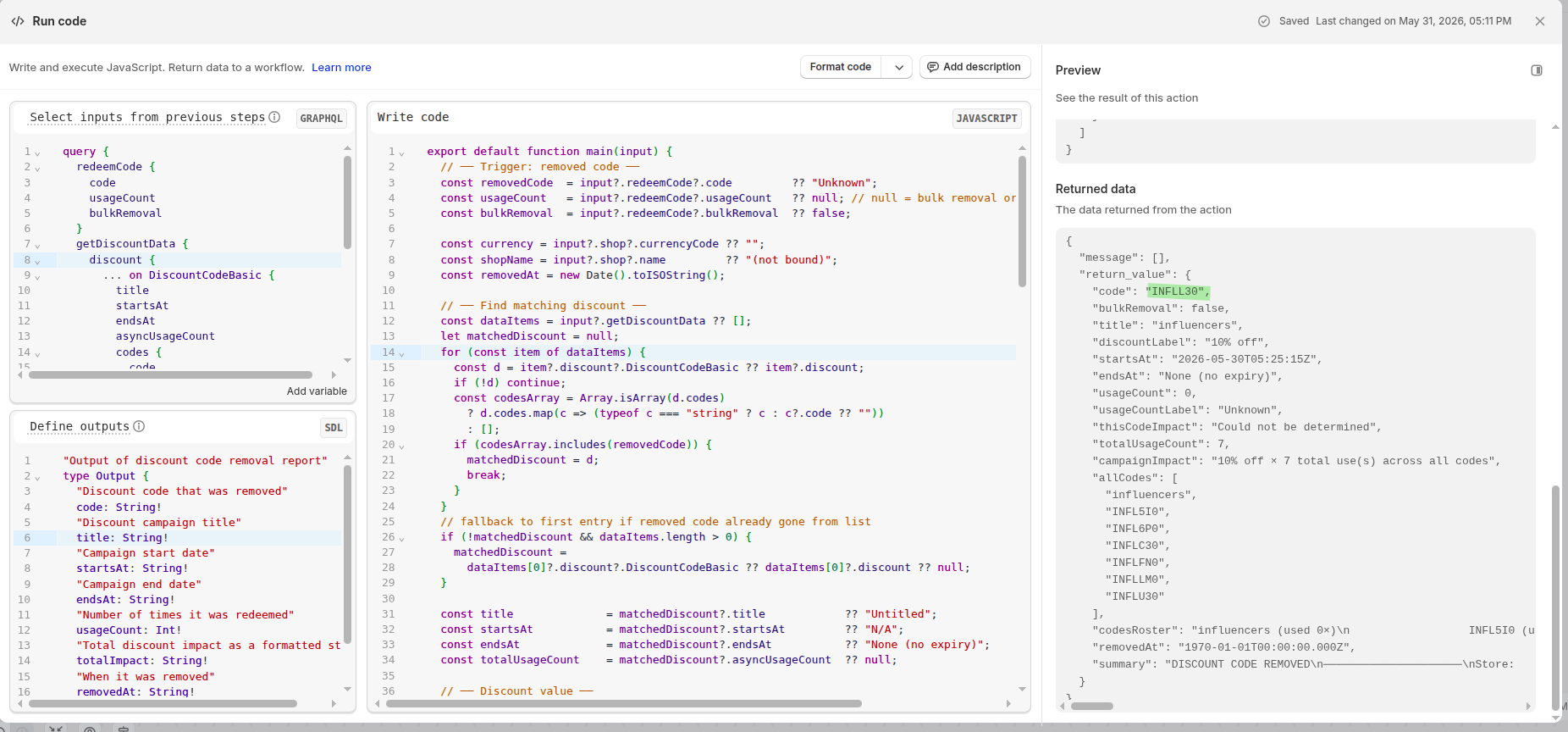
Use the following GraphQL query in Select inputs from previous steps:
query {
  redeemCode {
    code
    usageCount
    bulkRemoval
  }
  getDiscountData {
    discount {
      ... on DiscountCodeBasic {
        title
        startsAt
        endsAt
        asyncUsageCount
        codes {
          code
          asyncUsageCount
        }
        customerGets {
          value {
            ... on DiscountAmount {
              amount { amount currencyCode }
            }
            ... on DiscountPercentage {
              percentage
            }
          }
        }
      }
    }
  }
}
Define the outputs like this:
"Output of discount code removal report"
type Output {
  "Discount code that was removed"
  code: String!
  "Discount campaign title"
  title: String!
  "Campaign start date"
  startsAt: String!
  "Campaign end date"
  endsAt: String!
  "Number of times it was redeemed"
  usageCount: Int!
  "Total discount impact as a formatted string"
  totalImpact: String!
  "When it was removed"
  removedAt: String!
  "Full summary for alerts"
  summary: String!
}
Then paste this code into Write code:
export default function main(input) {
  // ── Trigger: removed code ──
  const removedCode  = input?.redeemCode?.code         ?? "Unknown";
  const usageCount   = input?.redeemCode?.usageCount   ?? null; // null = bulk removal or unknown
  const bulkRemoval  = input?.redeemCode?.bulkRemoval  ?? false;

  const currency = input?.shop?.currencyCode ?? "";
  const shopName = input?.shop?.name         ?? "(not bound)";
  const removedAt = new Date().toISOString();

  // ── Find matching discount ──
  const dataItems = input?.getDiscountData ?? [];
  let matchedDiscount = null;
  for (const item of dataItems) {
    const d = item?.discount?.DiscountCodeBasic ?? item?.discount;
    if (!d) continue;
    const codesArray = Array.isArray(d.codes)
      ? d.codes.map(c => (typeof c === "string" ? c : c?.code ?? ""))
      : [];
    if (codesArray.includes(removedCode)) {
      matchedDiscount = d;
      break;
    }
  }
  // fallback to first entry if removed code already gone from list
  if (!matchedDiscount && dataItems.length > 0) {
    matchedDiscount =
      dataItems[0]?.discount?.DiscountCodeBasic ?? dataItems[0]?.discount ?? null;
  }

  const title              = matchedDiscount?.title            ?? "Untitled";
  const startsAt           = matchedDiscount?.startsAt         ?? "N/A";
  const endsAt             = matchedDiscount?.endsAt           ?? "None (no expiry)";
  const totalUsageCount    = matchedDiscount?.asyncUsageCount  ?? null;

  // ── Discount value ──
  const valueWrapper = matchedDiscount?.customerGets?.value ?? {};
  const pctObj       = valueWrapper?.DiscountPercentage ?? null;
  const amtObj       = valueWrapper?.DiscountAmount ?? valueWrapper?.amount ?? null;

  let discountLabel = "Unknown";
  if (pctObj?.percentage != null) {
    discountLabel = `${(pctObj.percentage * 100).toFixed(0)}% off`;
  } else if (amtObj?.amount != null) {
    const cur = amtObj.currencyCode || currency;
    discountLabel = `${cur} ${parseFloat(amtObj.amount).toFixed(2)} off`;
  }

  // ── This code's impact ──
  let thisCodeImpact;
  if (bulkRemoval) {
    thisCodeImpact = `Not available - removed as part of bulk deletion`;
  } else if (usageCount === null) {
    thisCodeImpact = `Could not be determined`;
  } else if (pctObj?.percentage != null) {
    thisCodeImpact = `${discountLabel} × ${usageCount} use(s)`;
  } else if (amtObj?.amount != null) {
    const perUse = parseFloat(amtObj.amount);
    const cur    = amtObj.currencyCode || currency;
    thisCodeImpact = `${cur} ${(perUse * usageCount).toFixed(2)} (${cur} ${perUse.toFixed(2)} × ${usageCount} uses)`;
  } else {
    thisCodeImpact = "Unknown";
  }

  // ── Campaign-wide impact using asyncUsageCount on the discount ──
  let campaignImpact;
  if (totalUsageCount === null) {
    campaignImpact = "Not available";
  } else if (pctObj?.percentage != null) {
    campaignImpact = `${discountLabel} × ${totalUsageCount} total use(s) across all codes`;
  } else if (amtObj?.amount != null) {
    const perUse = parseFloat(amtObj.amount);
    const cur    = amtObj.currencyCode || currency;
    campaignImpact = `${cur} ${(perUse * totalUsageCount).toFixed(2)} total (${cur} ${perUse.toFixed(2)} × ${totalUsageCount} uses)`;
  } else {
    campaignImpact = "Unknown";
  }

  // ── Per-code breakdown ──
  const codesNodes = Array.isArray(matchedDiscount?.codes)
    ? matchedDiscount.codes
    : [];

  const allCodes = codesNodes
    .map(c => (typeof c === "string" ? c : c?.code ?? ""))
    .filter(Boolean);

  const codesRoster = codesNodes.length
    ? codesNodes.map(c => {
        const code = typeof c === "string" ? c : c?.code ?? "";
        const used = c?.asyncUsageCount ?? "?";
        const flag = code === removedCode ? " ← REMOVED" : "";
        return `${code} (used ${used}×)${flag}`;
      }).join("\n                  ")
    : "N/A";

  const usageCountLabel = bulkRemoval
    ? "N/A (bulk removal)"
    : usageCount !== null
      ? String(usageCount)
      : "Unknown";

  const summary =
    `DISCOUNT CODE REMOVED\n` +
    `─────────────────────\n` +
    `Store:            ${shopName}\n` +
    `Code removed:     ${removedCode}\n` +
    `Bulk removal:     ${bulkRemoval ? "Yes" : "No"}\n` +
    `Campaign:         ${title}\n` +
    `Discount:         ${discountLabel}\n` +
    `Valid from:       ${startsAt}\n` +
    `Valid until:      ${endsAt}\n` +
    `\n` +
    `THIS CODE\n` +
    `  Times used:     ${usageCountLabel}\n` +
    `  Impact:         ${thisCodeImpact}\n` +
    `\n` +
    `CAMPAIGN TOTAL\n` +
    `  Total uses:     ${totalUsageCount ?? "Unknown"}\n` +
    `  Total impact:   ${campaignImpact}\n` +
    `\n` +
    `CODE BREAKDOWN\n` +
    `  ${codesRoster}\n` +
    `\n` +
    `Removed at:       ${removedAt}`;

const safeSummary = summary
  .replace(/\\/g, "\\\\")   // escape backslashes first
  .replace(/"/g, '\\"')     // escape quotes
  .replace(/\n/g, "\\n")    // escape newlines
  .replace(/\r/g, "\\r");

  return {
    code:           removedCode,
    bulkRemoval,
    title,
    discountLabel,
    startsAt,
    endsAt,
    usageCount:     usageCount ?? 0,
    usageCountLabel,
    thisCodeImpact,
    totalUsageCount: totalUsageCount ?? 0,
    campaignImpact,
    allCodes,
    codesRoster,
    removedAt,
    summary: safeSummary,
  };
}
Add the HTTP Request action. In the Variables or Body Override (JSON) field, send the summary returned by the Run code step:
{
  "body": {
    "text": "{{runCode.summary}}"
  }
}
This posts the generated summary to the Slack webhook workflow using the text variable.
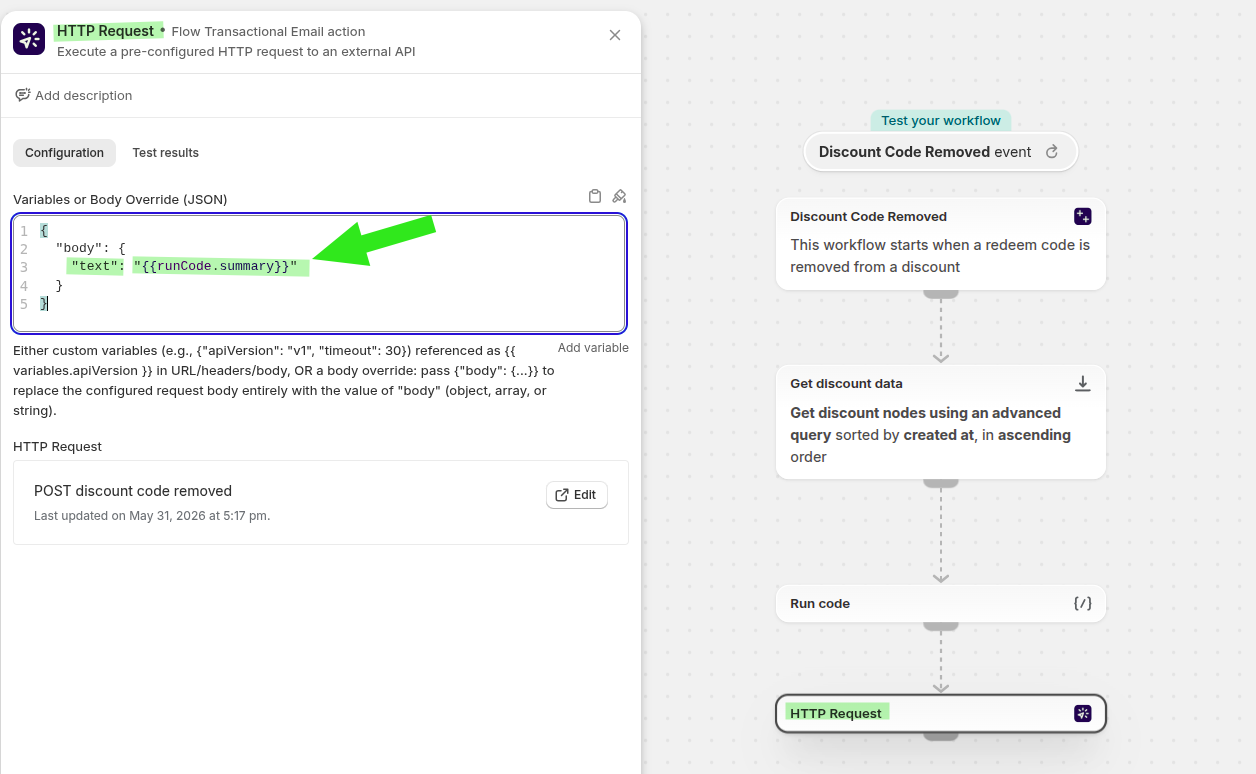
Save the workflow after all steps are in place.
To test, delete a discount code from your discount campaign and confirm the Slack channel receives the summary message.
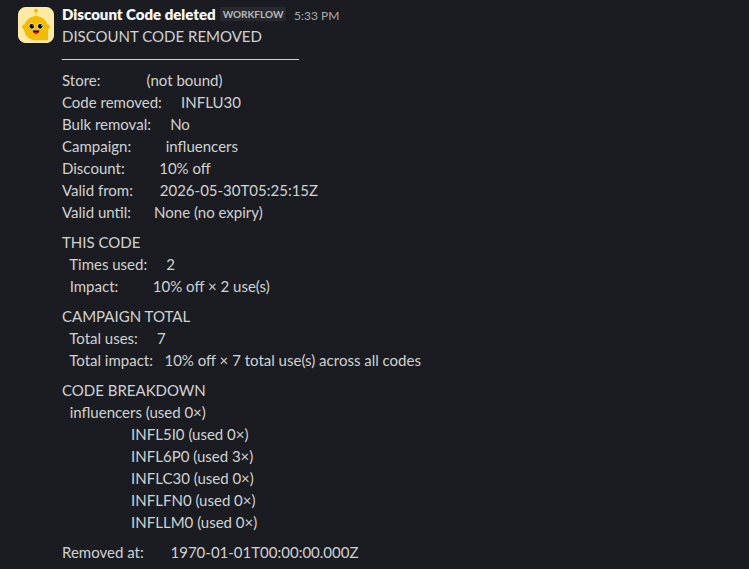
What the Slack alert includes
- The removed discount code
- Whether it was a bulk removal
- The campaign title
- The discount value
- Start and end dates
- Times used for the removed code
- Estimated impact for the removed code
- Campaign-wide usage and impact
- A code-by-code breakdown when available
- The timestamp when the removal was processed
Troubleshooting
Go back to Apps > Workflow Trigger Extensions and confirm Grant Discount Access is enabled. The discount triggers only appear after access is granted.
Double-check the advanced query in Edit query. The ID should be cleaned exactly as shown:
id:"{{discount.id|remove:'gid://shopify/DiscountCodeNode/'}}"Make sure the Slack workflow starts with a webhook, the webhook URL is the one used by your HTTP request, and the request body includes the text field.
Some removals may be part of a bulk action or may not return complete usage details. In those cases, the summary will still send the best available information and clearly label missing values.
Best practices
- Send these alerts to a dedicated finance or operations channel instead of a general support channel.
- Keep the workflow name specific, such as Discount Code Removed, so it is easy to identify in Shopify Flow and Slack.
- Test with a non-production discount code first to confirm the message format and webhook behavior.